FSMO Role’lerden olan RID Master rolüne sahip olan Domain Controller’da sorun olması durumunda yada Rid Available Pool’un maximum limitlere gelmesi durumunda yaşanacak sorunlar ve çözümleri aşağıdaki gibidir.

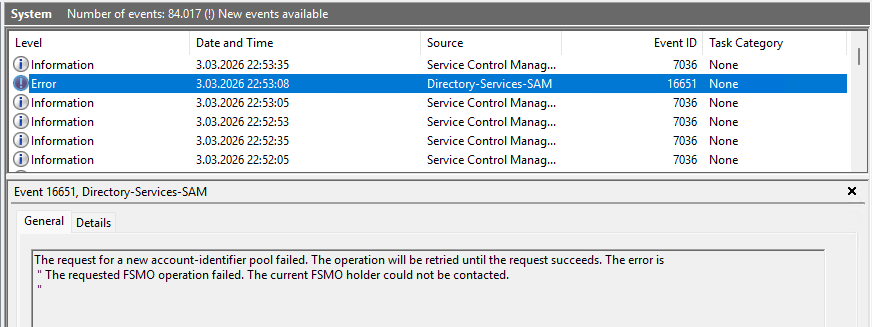
| Event | Açıklama |
| 16650 | RID pool request başarısız |
| 16654 | RID allocation block edildi |
| 16653 | RID pool genişletildi |
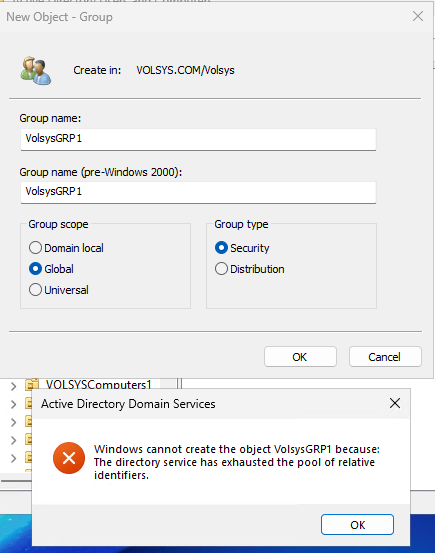
Aşağıdaki komut ile kontrol ettiğimde,
dcdiag /test:ridmanager /v

Rid pool tamamen biterse eğer aşağıdaki hata ile karşılaşılır.
The maximum domain account identifier value has been reached. No further account-identifier pools can be allocated to domain controllers in this domain.
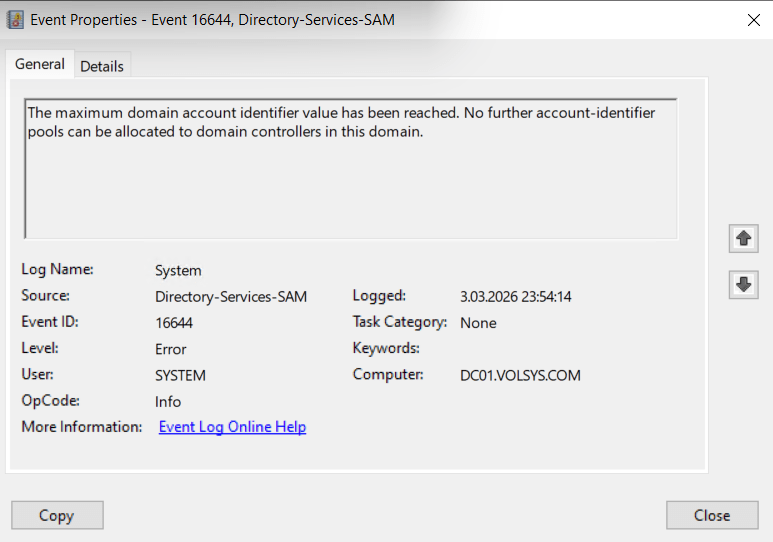
Bu, Active Directory’de RID global havuzunun üst sınırına ulaşıldığını gösterir. Bu durumda:
Yeni user
Yeni group
Yeni computer
oluşturulamaz çünkü yeni RID block dağıtılamaz.
Unlocked Global RID space
LDP
Connection – connect – Dcname
Browse – modify
DC’I boş bırak
Edit entry Attribute değerini SidCompatibilityVersion yap
Value 1
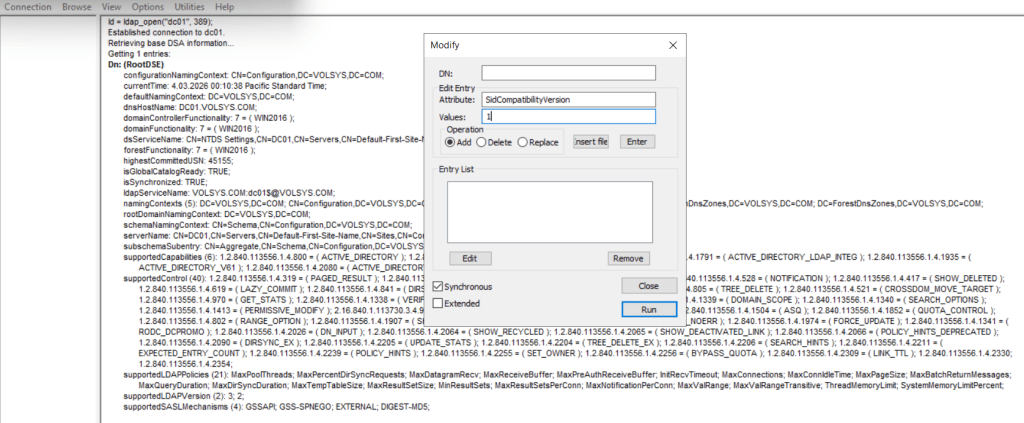
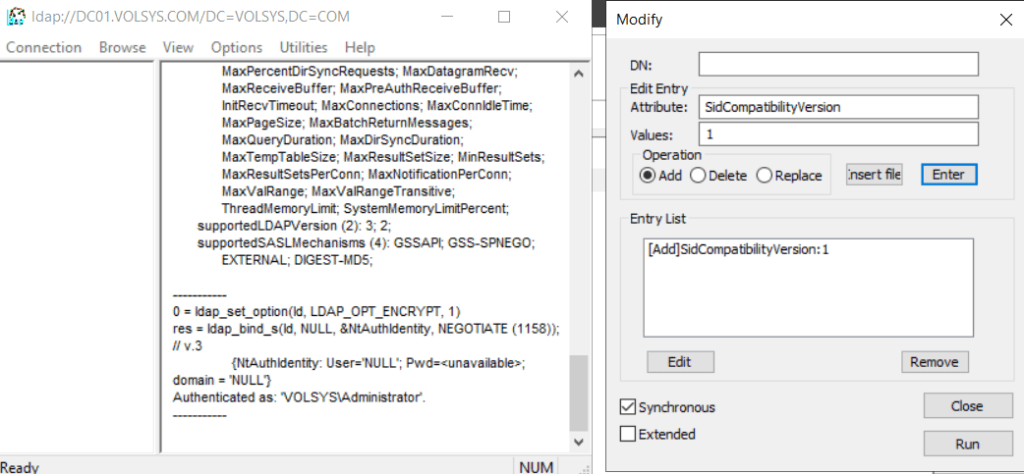
Manuel olarak global RID space değiştirildiğinde
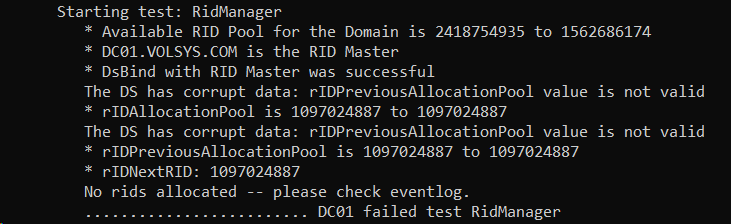
Bu metnin kısa ve net özeti aşağıdadır:
RID Ceiling Enforcement (RID Üst Sınır Mekanizması)
Windows Server 2012 ile birlikte Active Directory’de RID tükenmesini önlemek için bir güvenlik mekanizması eklendi.
Global RID alanının %90’ı kullanıldığında (yani %10 kaldığında) sistem otomatik olarak RID dağıtımını durdurur.
Bu durum oluştuğunda:
RID Master, yeni RID blokları dağıtmayı durdurur.
Event ID 16657 (Directory-Services-SAM) System log’a yazılır.
Domain Controller’lar sadece daha önce aldıkları RID bloklarını kullanmaya devam eder.
Runaway RID allocation (kontrolsüz RID tüketimi) durumlarını tespit etmek
RID alanının tamamen bitmesini önlemek
RID sınır değerleri
| RID Space | Tetikleme noktası |
| Default (30-bit) | 966,367,640 RID (%90 kullanılmış) |
| Unlock edilmiş (31-bit) | 1,932,735,282 RID |
RID Master şu attribute’u FALSE yapar:
msDS-RIDPoolAllocationEnabled
Object:
CN=RID Manager$,CN=System,DC=<domain>
Bu durumda hiçbir DC yeni RID pool alamaz.
Blok kaldırmak için
Attribute tekrar TRUE yapılır:
msDS-RIDPoolAllocationEnabled = TRUE
Sonraki RID allocation sonrası attribute tekrar NOT SET olur.
Monitor etmek içinaşağıdaki eventler izlenmelidir.
| Event ID | 16653 |
| Source | Directory-Services-SAM |
| Severity | Warning |
| Message | A pool size for account-identifiers (RIDs) that was configured by an Administrator is greater than the supported maximum. The maximum value of %1 will be used when the domain controller is the RID master. For more information, see RID Block Size Limit. |
| Notes and resolution | The maximum value for the RID Block Size is now 15000 decimal (3A98 hexadecimal). A domain controller can’t request more than 15,000 RIDs. This event logs at every boot until the value is set to a value at or below this maximum. |
| Event ID | 16654 |
| Source | Directory-Services-SAM |
| Severity | Informational |
| Message | A pool of account-identifiers (RIDs) has been invalidated. This may occur in the following expected cases: 1. A domain controller is restored from backup. 2. A domain controller running on a virtual machine is restored from snapshot. 3. An administrator has manually invalidated the pool. See https://go.microsoft.com/fwlink/?LinkId=226247 for more information. |
| Notes and resolution | If this event is unexpected, contact all domain administrators and determine which of them performed the action. The Directory Services event log also contains further information on when one of these steps was performed. |
| Event ID | 16655 |
| Source | Directory-Services-SAM |
| Severity | Informational |
| Message | The global maximum for account-identifiers (RIDs) has been increased to %1. |
| Notes and resolution | If this event is unexpected, contact all domain administrators and determine which of them performed the action. This event notes the increase of the overall RID pool size beyond the default of 230and won’t happen automatically; only by administrative action. |
| Event ID | 16655 |
| Source | Directory-Services-SAM |
| Severity | Informational |
| Message | The global maximum for account-identifiers (RIDs) has been increased to %1. |
| Notes and resolution | If this event is unexpected, contact all domain administrators and determine which of them performed the action. This event notes the increase of the overall RID pool size beyond the default of 230and won’t happen automatically; only by administrative action. |
| Event ID | 16657 |
| Source | Directory-Services-SAM |
| Severity | Error |
| Message | Action required! This domain has consumed a considerable portion of the total available account-identifiers (RIDs). A protection mechanism has been activated because the total available account-identifiers remaining is less than: X% [artificial ceiling argument]. The protection mechanism prevents account creation until you manually re-enable account-identifier allocation on the RID master domain controller. It’s extremely important that certain diagnostics are performed prior to re-enabling account creation to ensure this domain isn’t consuming account-identifiers at an abnormally high rate. Any issues identified should be resolved prior to re-enabling account creation. Failure to diagnose and fix any underlying issue causing an abnormally high rate of account-identifier consumption can lead to account-identifier exhaustion in the domain after which account creation will be permanently disabled in this domain. See https://go.microsoft.com/fwlink/?LinkId=228610 for more information. |
| Notes and resolution | Contact all domain administrators and inform them that no further security principals can be created in this domain until this protection is overridden. For more information about how to override the protection and possibly increase the overall RID pool, see Global RID Space Size Unlock. |
| Event ID | 16658 |
| Source | Directory-Services-SAM |
| Severity | Warning |
| Message | This event is a periodic update on the remaining total quantity of available account-identifiers (RIDs). The number of remaining account-identifiers is approximately: %1. Account-identifiers are used as accounts are created, when they’re exhausted no new accounts may be created in the domain. See https://go.microsoft.com/fwlink/?LinkId=228745 for more information. |
| Notes and resolution | Contact all domain administrators and inform them that RID consumption has crossed a major milestone; determine if this is expected behavior or not by reviewing security trustee creation patterns. To ever see this event would be highly unusual, as it means that at least ~100 million RIDS have been allocated. |
Powershell ile kalan RID sayısını hesaplama:
Import-Module ActiveDirectory
$domainDN = (Get-ADDomain).DistinguishedName
$ridManager = Get-ADObject `
-Identity “CN=RID Manager$,CN=System,$domainDN” `
-Properties rIDAvailablePool,msDS-RIDPoolAllocationEnabled
$ridManager
Import-Module ActiveDirectory
$domain = Get-ADDomain
$domainDN = $domain.DistinguishedName
$ridManager = Get-ADObject `
-Identity “CN=RID Manager$,CN=System,$domainDN” `
-Properties rIDAvailablePool,msDS-RIDPoolAllocationEnabled
$pool = [Int64]$ridManager.rIDAvailablePool
$lowPart = $pool -band 0xFFFFFFFF
$highPart = $pool -shr 32
$totalRemaining = $highPart – $lowPart + 1
[PSCustomObject]@{
Domain = $domain.DNSRoot
RIDMaster = $domain.RIDMaster
LowPart = $lowPart
HighPart = $highPart
RemainingRIDs = $totalRemaining
RIDPoolAllocationEnabled = $ridManager.’msDS-RIDPoolAllocationEnabled’
}
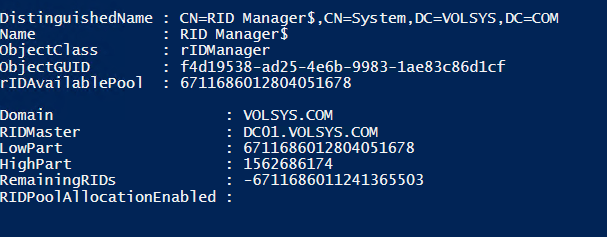
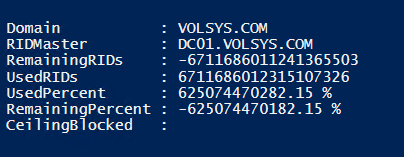
Yüzde olarak görmek için:
Import-Module ActiveDirectory
$domain = Get-ADDomain
$domainDN = $domain.DistinguishedName
$ridManager = Get-ADObject `
-Identity “CN=RID Manager$,CN=System,$domainDN” `
-Properties rIDAvailablePool,msDS-RIDPoolAllocationEnabled
$pool = [Int64]$ridManager.rIDAvailablePool
$lowPart = $pool -band 0xFFFFFFFF
$highPart = $pool -shr 32
$remaining = $highPart – $lowPart + 1
# Varsayılan 30-bit global RID space
$defaultMax = 1073741823
$used = $defaultMax – $remaining
$usedPct = [math]::Round(($used / $defaultMax) * 100, 2)
$remainingPct = [math]::Round(($remaining / $defaultMax) * 100, 2)
[PSCustomObject]@{
Domain = $domain.DNSRoot
RIDMaster = $domain.RIDMaster
RemainingRIDs = $remaining
UsedRIDs = $used
UsedPercent = “$usedPct %”
RemainingPercent = “$remainingPct %”
CeilingBlocked = $ridManager.’msDS-RIDPoolAllocationEnabled’
}
Kaynak: https://learn.microsoft.com/en-us/windows-server/identity/ad-ds/manage/managing-rid-issuance
 Active Directory - Cyber Security